1. 项目背景
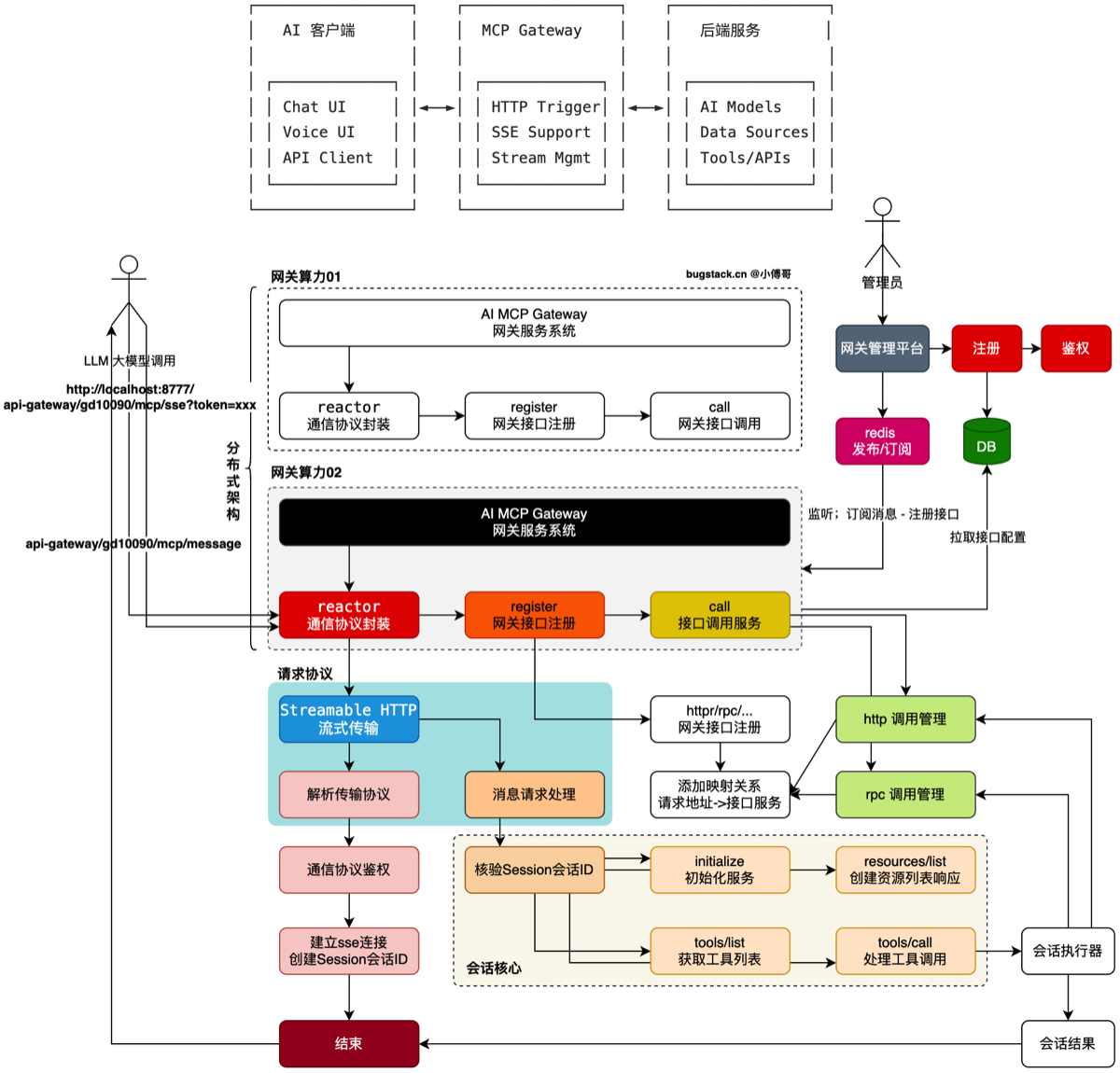
- 核心目的:为 AI 客户端的 MCP 服务协议使用诉求,提供便利性。后端服务接口可以在 MCP 网关进行注册,提供 MCP 协议类型接口。
- 实现过程:以 MCP 协议 JSON-RPC2 通信结构,设计实现流式传输 Streamable HTTP 框架,完成 MCP 网关接口协议解析和消息处理。在消息处理过程中,则对注册进来的 http/rpc/… 接口进行调用。这部分会包括接口的描述性信息获取以及会话执行调用。更多细节会在后续的设计和编码中陆续体现
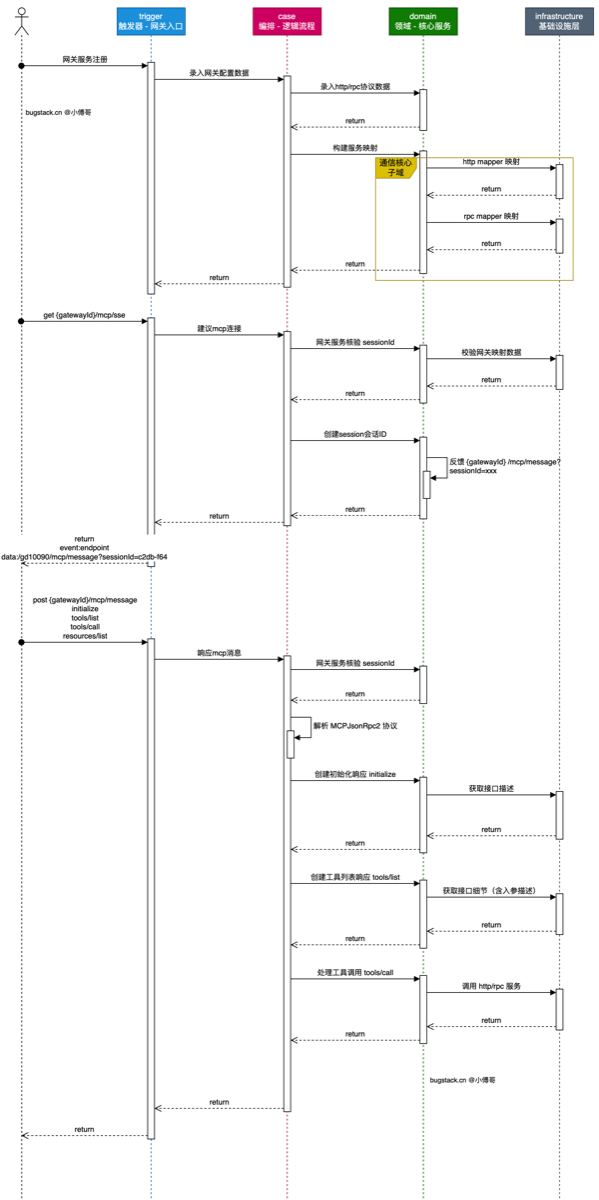
- 是网关服务的注册,这部分提供管理端由用户进行接口配置注册操作,注册时把接口
http/rpc进行详细拆解,录入到数据库中。在服务启动时,可以把接口进行服务加载,放到请求池中,等待调用。 - mcp 协议的2个调用过程,一个
{gatewayId}/mcp/sse建立连接,创建出sessionId进行服务关联。首次建立连接后,会返回一个/gd10090/mcp/message?sessionId=c2db-f64之后在请求返回的地址,进行调用。 - 请求
{gatewayId}/mcp/message进行消息处理,完成initialze、tools/list、tools/call、resources/list,步骤调用。这些步骤需要从网关服务注册进来的接口中获取,而 tools/call 则是发起 http/rpc 接口调用。
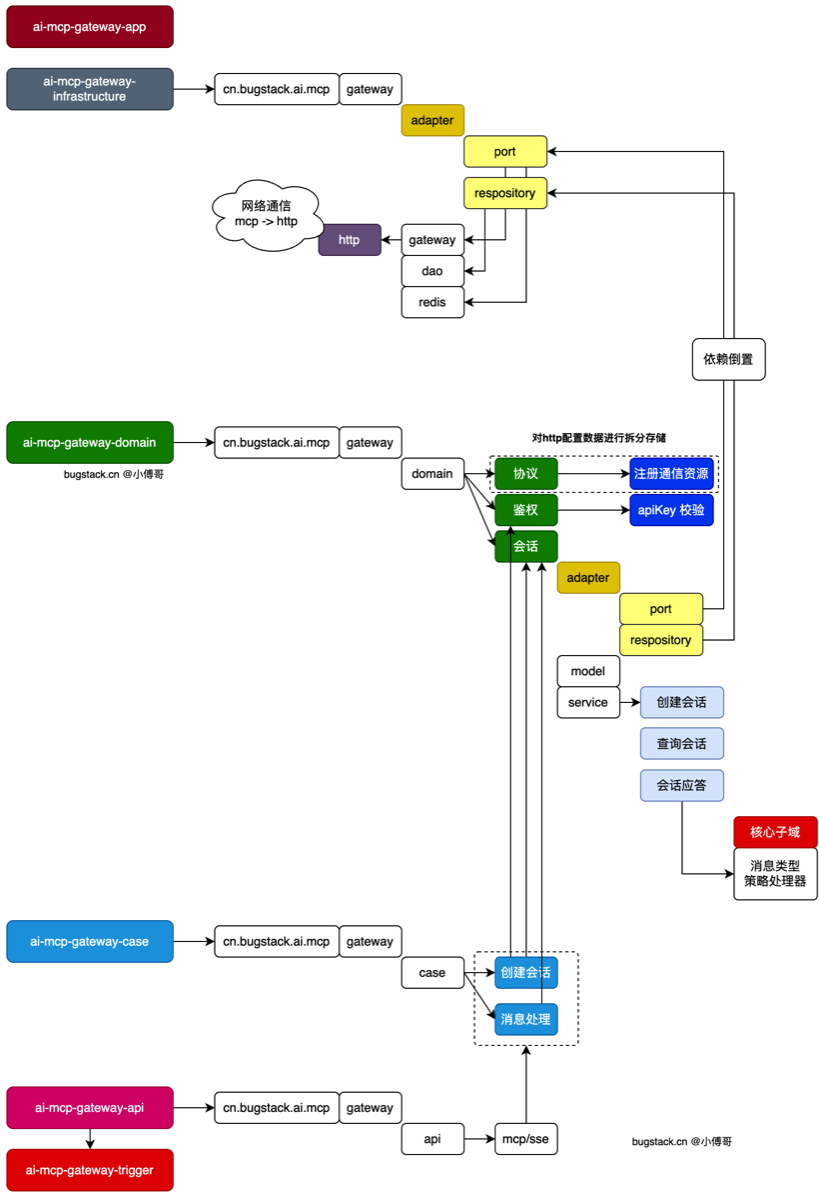
- trigger 是触发器层,我们把所有外部(http、rpc)调用我们,job调用,接收mq调用,都称之为触发动作。
- case 是功能编排层,它的出现是为了减轻 trigger 层的压力。原本 trigger 要调用 domain 的领域层的各个方法完成逻辑串联,这部分拆分到 case 层来做处理,让 trigger 的 http 实现,只关心结果的封装和异常的打印。而这里的 case 层会有 mcp 的创建会话、消息处理的操作。后续还会随着功能开发增加其他 case 逻辑。
- domain 是领域层,实现各个模块功能,包括;协议、鉴权、会话的处理。会话会有创建会话、查询会话和对会话的应答处理。
- infrastructure 是基础设施层,所有资源和外部服务的链接,都会放到这里处理。这里还会实现 domain 领域层在 adapter 适配器内定义的接口,通过依赖倒置的方式实现。
2.MCP 协议
MCP通信协议(json-rpc2)
AI 大脑(客户端)要指挥外部工具(服务端)干活,两者必须说同一种语言,否则就是鸡同鸭讲。JSON-RPC 2.0 就是它们之间约定的“标准信件格式”。
JSON 结构:
- 请求(我要你干活):必定包含
method(比如叫你去查天气)和params(参数是北京)。 - 应答(活干完了):必定包含
result(成功的结果)或者error(失败的报错)。 - 通知(顺便告诉你一声):只有
method和参数,不需要对方回复。
3.如何定义session
1.定义session的结构与方法
用会话值对象SessionConfigVO.java
	//构造函数
    public SessionConfigVO(String sessionId, Sinks.Many<ServerSentEvent<String>> sink) {
        this.sessionId = sessionId;
        this.sink = sink;
        this.createTime = Instant.now();
        this.lastAccessedTime = Instant.now();
        this.active = true;
    }
流式响应Sinks.Many用来存消息 sink,并内置一些方法比如过期时间判断,时间更新,功能内聚
- 新增了会话服务接口与实现
ISessionManagementService.java
SessionManagementService.java
包括怎样创建会话,删除,get会话,清理过期会话与 shutdown 会话
- 其中,保存会话用
private final Map<String, SessionConfigVO> activeSessions = new ConcurrentHashMap<>();
2.理解流式响应
sink是这个 session 的“消息出口” - 会话一建好,先给客户端推一条“你接下来要往哪个地址发消息”的信息
    public SessionConfigVO createSession(String gatewayId) {
        log.info("创建会话 gatewayId:{}", gatewayId);

        String sessionId = UUID.randomUUID().toString();

        Sinks.Many<ServerSentEvent<String>> sink = Sinks.many().multicast().onBackpressureBuffer();

        // 发送端点消息 - 告知客户端消息请求地址(客户端第二次会使用 messageEndpoint 进行请求会话)
        //塞进一个endpoint事件 :/api-gateway/{gatewayId}/mcp/sse?sessionId=xxx
        //封装成 SessionConfigVO 返回,这样就能根据 id 的到 endpoint
        String messageEndpoint = "/api-gateway/" + gatewayId + "/mcp/sse?sessionId=" + sessionId;
        sink.tryEmitNext(ServerSentEvent.<String>builder()
                .event("endpoint")
                .data(messageEndpoint)
                .build());

        SessionConfigVO sessionConfigVO = new SessionConfigVO(sessionId, sink);

        activeSessions.put(sessionId, sessionConfigVO);

        log.info("创建会话 gatewayId:{} sessionId:{},当前活跃会话数:{}", gatewayId, sessionId, activeSessions.size());

        return sessionConfigVO;
    }
到 endNode 节点后通过
return sink.asFlux()
                .mergeWith(
                ....
把 sink 转成一个 Flux
- 这个 Flux 就是 SSE 响应流
- 再拼一个每 60 秒发一次的 ping 心跳
- 如果连接取消或终止,就 removeSession(sessionId) 清理会话
所以最终 Controller 返回的 Flux<ServerSentEvent<String>>,不是一次性结果,而是一条持续打开的 SSE 连接。
客户端刚连上时,最先收到的不是业务结果,而是一条 endpoint 事件。 这条事件是在 SessionManagementService.java:55 发出去的。
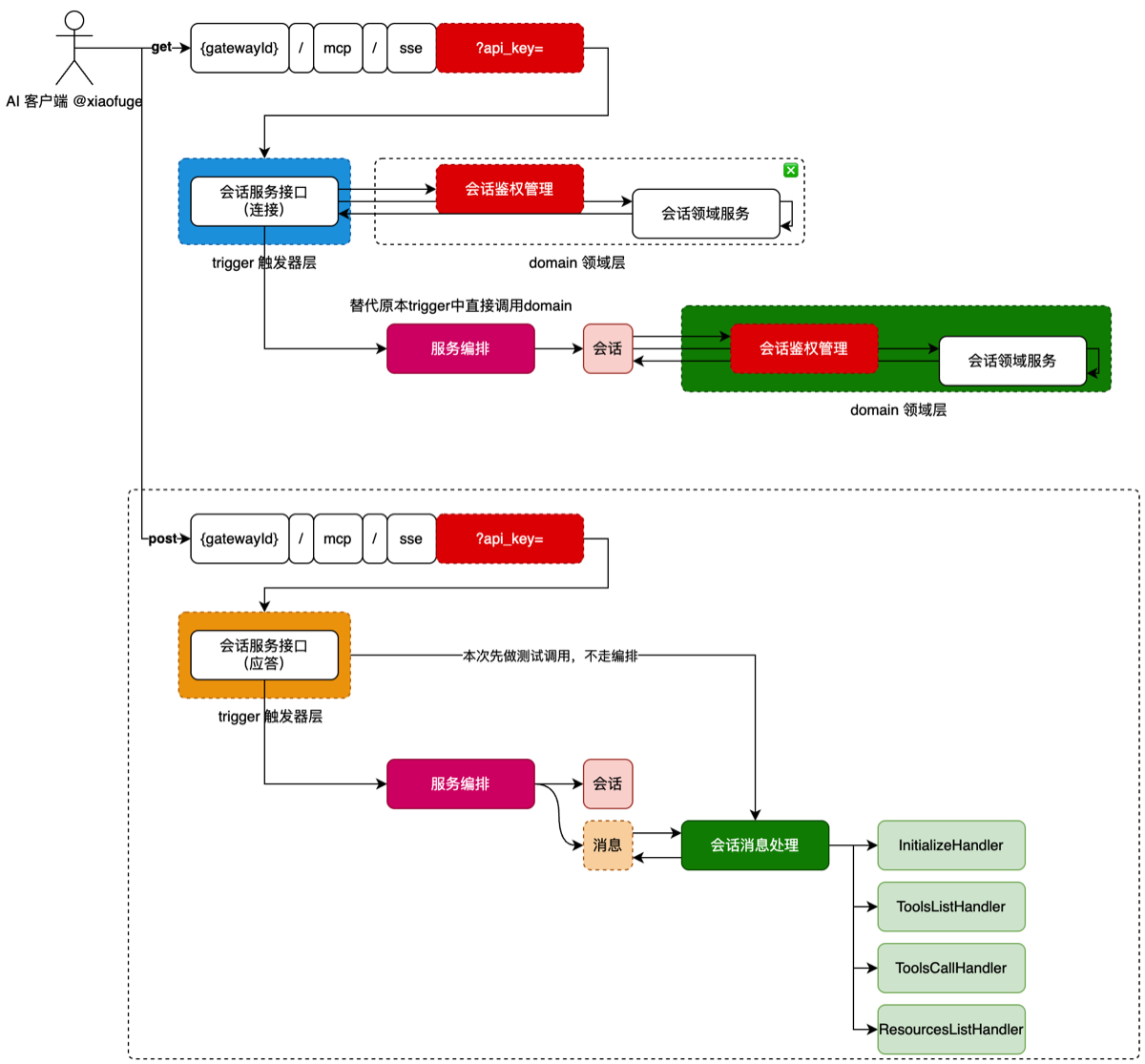
4.建立会话链
  - McpGatewayController.java
  - McpMessageService.java
  - RootNode.java
  - VerifyNode.java
  - SessionNode.java
- EndNode.java- 在 controller 层暴露接口 API,开始创建回回 MCPsession,做一个简单的校验后,交个 case 层McpMessageService。
- 之后从工厂类取出第一个节点也就是 rootNode(目前仅打印开始创建会话)
- 公共父类是AbstractMcpSessionSupport.java 。 它继承了一个策略路由器,所以每个节点本质上都在做两件事:当前做的是 doApplay 和get 下个节点
- 鉴权层目前是空的,session 层创建会话,塞入上下文
- 最后 end 层返回一个 sse 链接
- AbstractMcpSessionSupport 是项目对外部策略路由框架的二次包装,当前偏薄,但不是完全没用。
- doApply 和 get 已经由上层框架定义好了,所以这里不需要重复声明。
- dynamicContext 就是这条节点链内部传递中间结果的容器,当前最主要的作用就是把 SessionNode 创建出来的 SessionConfigVO 传给 EndNode。
5.消息分发流程
建立持续会话连接后,在 controller 层创建一个“处理会话发来的 MCP 消息”
-
McpSchemaVO:协议消息数据 两个作用: 1.用来定义“消息格式” 2.把已经符合 MCP/JSON-RPC 结构的 JSON 字符串,解析成 Java 对象JSONRPCRequest或JSONRPCResponse。供后续代码使用
-
SessionMessageService.java
- 在 conroller 层转为 java 对象后,开始根据枚举类找到真正的handler Bean,根据协议里的 method 方法去找不同的 Handler,如一下的 InitializeHandler
- SessionMessageHandlerMethodEnum.负责对应关系
-
InitializeHandler.java
核心就是: “POST 过来一条 JSON-RPC 消息,系统怎么根据 method 找到对应 handler。”
6.创建MCP客户端
public class ApiTest {

    // 在这里直接填写你的智谱 API Key,仅用于本地测试。
    private static final String ZHIPU_API_KEY = "3b07934ad55f49ac948c2c66abcfec7c.lLYncQbI1iO49txx";

    public static void main(String[] args) throws Exception {
        OpenAiApi openAiApi = OpenAiApi.builder()
                .baseUrl("https://open.bigmodel.cn/api/paas/v4")
                .apiKey(ZHIPU_API_KEY)
                .completionsPath("/chat/completions")
                .embeddingsPath("/embeddings")
                .build();

        ChatModel chatModel = OpenAiChatModel.builder()
                .openAiApi(openAiApi)
                .defaultOptions(OpenAiChatOptions.builder()
                        .model("glm-4.5-air")
                        .toolCallbacks(new SyncMcpToolCallbackProvider(sseMcpClient02()).getToolCallbacks())
                        .build())
                .build();

        log.info("测试结果:{}", chatModel.call("你有哪些工具能力"));
    }
-
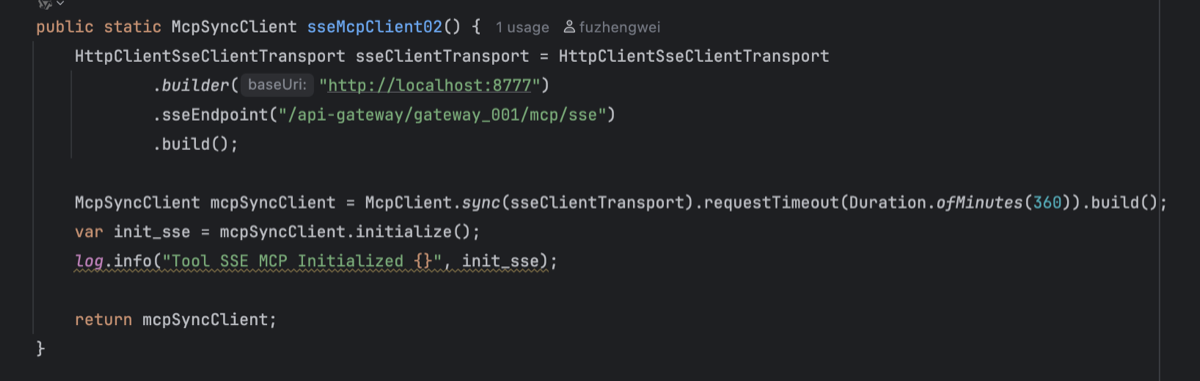
Deme项目的 ApiTest 作为 MCP 的 Client,指定 LLM 后,
.toolCallbacks(new SyncMcpToolCallbackProvider(sseMcpClient02()).getToolCallbacks())将McpClient包装为 给 LLM用的工具回调集合chatModel.call是通过 Client去问主项目tools/list,如果需要还要 tools/call -
关于 McpClient02 中的代码,
- sseClientTransport代表创建一个 传输层对象,告诉 MCP客户端使用那种协议去传递信息,目前使用 http+sse,builder 建立服务端的地址。sseEndpoint 代表建立 SSE 链接的入口,这里对应主项目中的Controller 中的 Get 接口
- 进入handleSseConnection方法中,server 端进入createSession(gatewayId),创建一个 SessionId,通过 SSE 推送一个时间 Endpoint,告诉Client 端,以后发送到 JSONRPC 请求发送至该目的地
- 指定用 SSE 的方式去链接一个 MCPServer 端(sync 表示给我一个同步调用风格的 MCP 客户端)
- initialized 表示“先按 MCP 协议和服务端握个手,拿到这个 MCP 服务端的初始化信息”
- 发送method 为 initialize 的 JSONRPC 消息给刚刚的 sse 地址,实际上到了主项目的 post 接口中的handleMessage
- 根据 sessionID 找会话,然后后序列化为McpSchemaVO定义的对象
- 进入processHandlerMessage中根据
private Map<String, IRequestHandler> requestHandlerMap;取出 request 中为哪个请求来决定进入哪个 handler
- sseClientTransport代表创建一个 传输层对象,告诉 MCP客户端使用那种协议去传递信息,目前使用 http+sse,builder 建立服务端的地址。sseEndpoint 代表建立 SSE 链接的入口,这里对应主项目中的Controller 中的 Get 接口
7.Initialize
@Override
    public McpSchemaVO.JSONRPCResponse handle(String gatewayId, McpSchemaVO.JSONRPCRequest message) {
        log.info("消息处理服务-initialize gatewayId:{} request.params:{}", gatewayId, JSON.toJSONString(message.params()));

        // 1. 转换参数
        McpSchemaVO.InitializeRequest initializeRequest = McpSchemaVO.unmarshalFrom(message.params(), new TypeReference<>() {
        });

        // 2. 查询配置
        McpGatewayConfigVO mcpGatewayConfigVO = repository.queryMcpGatewayConfigByGatewayId(gatewayId);

        // 3. 组装信息
        McpSchemaVO.InitializeResult initializeResult = new McpSchemaVO.InitializeResult(initializeRequest.protocolVersion(),
                new McpSchemaVO.ServerCapabilities(new McpSchemaVO.ServerCapabilities.CompletionCapabilities(),
                        new HashMap<>(),
                        new McpSchemaVO.ServerCapabilities.LoggingCapabilities(),
                        new McpSchemaVO.ServerCapabilities.PromptCapabilities(true),
                        new McpSchemaVO.ServerCapabilities.ResourceCapabilities(false, true),
                        new McpSchemaVO.ServerCapabilities.ToolCapabilities(true)),
                new McpSchemaVO.Implementation(mcpGatewayConfigVO.getToolName(), mcpGatewayConfigVO.getToolVersion()),
                mcpGatewayConfigVO.getToolDesc()
        );

        // 4. 返回结果
        return new McpSchemaVO.JSONRPCResponse(McpSchemaVO.JSONRPC_VERSION, message.id(), initializeResult, null);
}- 根据Client 端传来的网关 ID 和 Requst,转换为 Initiallize 的参数,根据网关 Id 查询仓储层数据库中配置的信息
- 再把数据库里的:
- toolName
- toolVersion
- toolDesc 组装进 Result 中返回给 Client 端
8.Tools/List
    public static void main(String[] args) throws Exception {
        OpenAiApi openAiApi = OpenAiApi.builder()
                .baseUrl("https://apis.itedus.cn")
                .apiKey("sk-j9brA5gtId49CpRG1d97E8F75dAb4066B7Cd73B0D9B481xx")
                .completionsPath("v1/chat/completions")
                .embeddingsPath("v1/embeddings")
                .build();

        ChatModel chatModel = OpenAiChatModel.builder()
                .openAiApi(openAiApi)
                .defaultOptions(OpenAiChatOptions.builder()
                        .model("gpt-4o")
                        .toolCallbacks(new SyncMcpToolCallbackProvider(sseMcpClient01()).getToolCallbacks())
                        .build())
                .build();

        log.info("测试结果:{}", chatModel.call("你有哪些工具能力"));
}-
toolCallbacks(new SyncMcpToolCallbackProvider(sseMcpClient01()).getToolCallbacks()内部先调了 listTools(),ChatModel.call() 用的是前面已经拿到的工具定义,如果模型真用工具,才会在 ToolCallback.call() 里发 tools/call -
接下来完成 list 的 Handler,核心:把数据库里的工具定义和参数映射,拼成 MCP 协议要求的 tools 列表。
-
查询数据库中的网关的基础配置与工具参数映射配置
-
字段名 - 父路径 - MCP 路径 - 类型 - 描述 - 是否必填 - 排序
buildTools() j将“扁平的数据库记录”变成“嵌套的 JSON Schema”。
数据库中path 为:
- xxxRequest01
- xxxRequest01.city
- xxxRequest01.company
- xxxRequest01.company.name
- xxxRequest01.company.type
- xxxRequest02
- xxxRequest02.employeeCount
但 MCP tools/list 需要的是这种树形结构:
  {
    "name": "JavaSDKMCPClient_getCompanyEmployee",
    "description": "获取公司雇员信息",
    "inputSchema": {
      "type": "object",
      "properties": {
        "xxxRequest01": {
          "type": "object",
          "properties": {
            "city": { "type": "string" },
            "company": {
              "type": "object",
              "properties": {
                "name": { "type": "string" },
                "type": { "type": "string" }
              }
            }
          }
        },
        "xxxRequest02": {
          "type": "object",
          "properties": {
            "employeeCount": { "type": "string" }
          }
        }
      }
    }
  }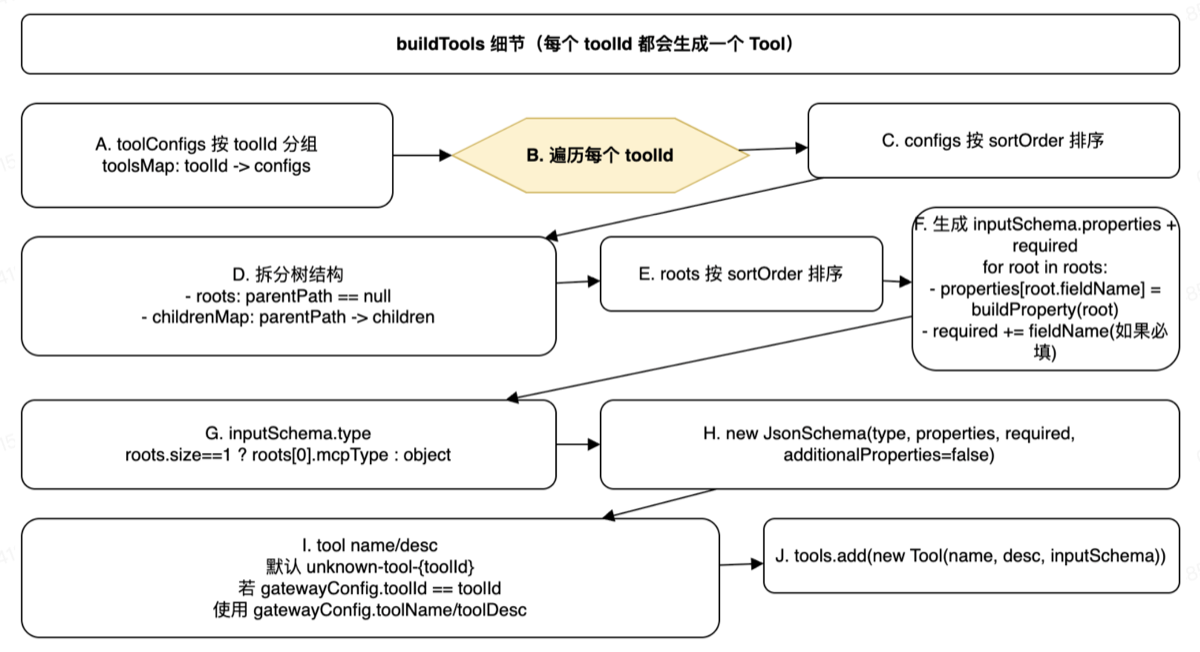
 private List<McpSchemaVO.Tool> buildTools(McpGatewayConfigVO gatewayConfig, List<McpGatewayToolConfigVO> toolConfigs) {
        // 1. 通过 toolId 一组组转换为 Map 结构
        Map<Long, List<McpGatewayToolConfigVO>> toolsMap = toolConfigs.stream()
                .collect(Collectors.groupingBy(McpGatewayToolConfigVO::getToolId));

        List<McpSchemaVO.Tool> tools = new ArrayList<>();

        for (Map.Entry<Long, List<McpGatewayToolConfigVO>> entry : toolsMap.entrySet()) {
            Long toolId = entry.getKey();
            List<McpGatewayToolConfigVO> configs = entry.getValue();

            // 排序
            configs.sort((o1, o2) -> {
                int s1 = o1.getSortOrder() != null ? o1.getSortOrder() : 0;
                int s2 = o2.getSortOrder() != null ? o2.getSortOrder() : 0;
                return Integer.compare(s1, s2);
            });

            // 父子元素 Map parentPath -> List<Children>
            Map<String, List<McpGatewayToolConfigVO>> childrenMap = new HashMap<>();

            List<McpGatewayToolConfigVO> roots = new ArrayList<>();

            for (McpGatewayToolConfigVO config : configs) {
                if (config.getParentPath() == null) {
                    roots.add(config);
                } else {
                    childrenMap.computeIfAbsent(config.getParentPath(), k -> new ArrayList<>()).add(config);
                }
            }

            // 排序
            roots.sort((o1, o2) -> {
                int s1 = o1.getSortOrder() != null ? o1.getSortOrder() : 0;
                int s2 = o2.getSortOrder() != null ? o2.getSortOrder() : 0;
                return Integer.compare(s1, s2);
            });

            // 构建输入结构
            Map<String, Object> properties = new HashMap<>();
            List<String> required = new ArrayList<>();

		//把每个根节点递归构造成一个属性定义,放进 properties;如果这个根节点是必填的,就把它的名字放进 required 列表。
            for (McpGatewayToolConfigVO root : roots) {
                properties.put(root.getFieldName(), buildProperty(root, childrenMap));
                if (Integer.valueOf(1).equals(root.getIsRequired())) {
                    required.add(root.getFieldName());
                }
            }

            // 获取类型
            String type = roots.size() == 1 ? roots.get(0).getMcpType() : "object";

            // 构造函数
            McpSchemaVO.JsonSchema inputSchema = new McpSchemaVO.JsonSchema(
                    type,
                    properties,
                    required.isEmpty() ? null : required,
                    false,
                    null,
                    null
            );

            // 工具描述
            String name = "unknown-tool-" + toolId;
            String desc = "";
            if (gatewayConfig != null && Objects.equals(gatewayConfig.getToolId(), toolId)) {
                name = gatewayConfig.getToolName();
                desc = gatewayConfig.getToolDesc();
            }

            tools.add(new McpSchemaVO.Tool(name, desc, inputSchema));
        }
        return tools;
    }
数据库结构为
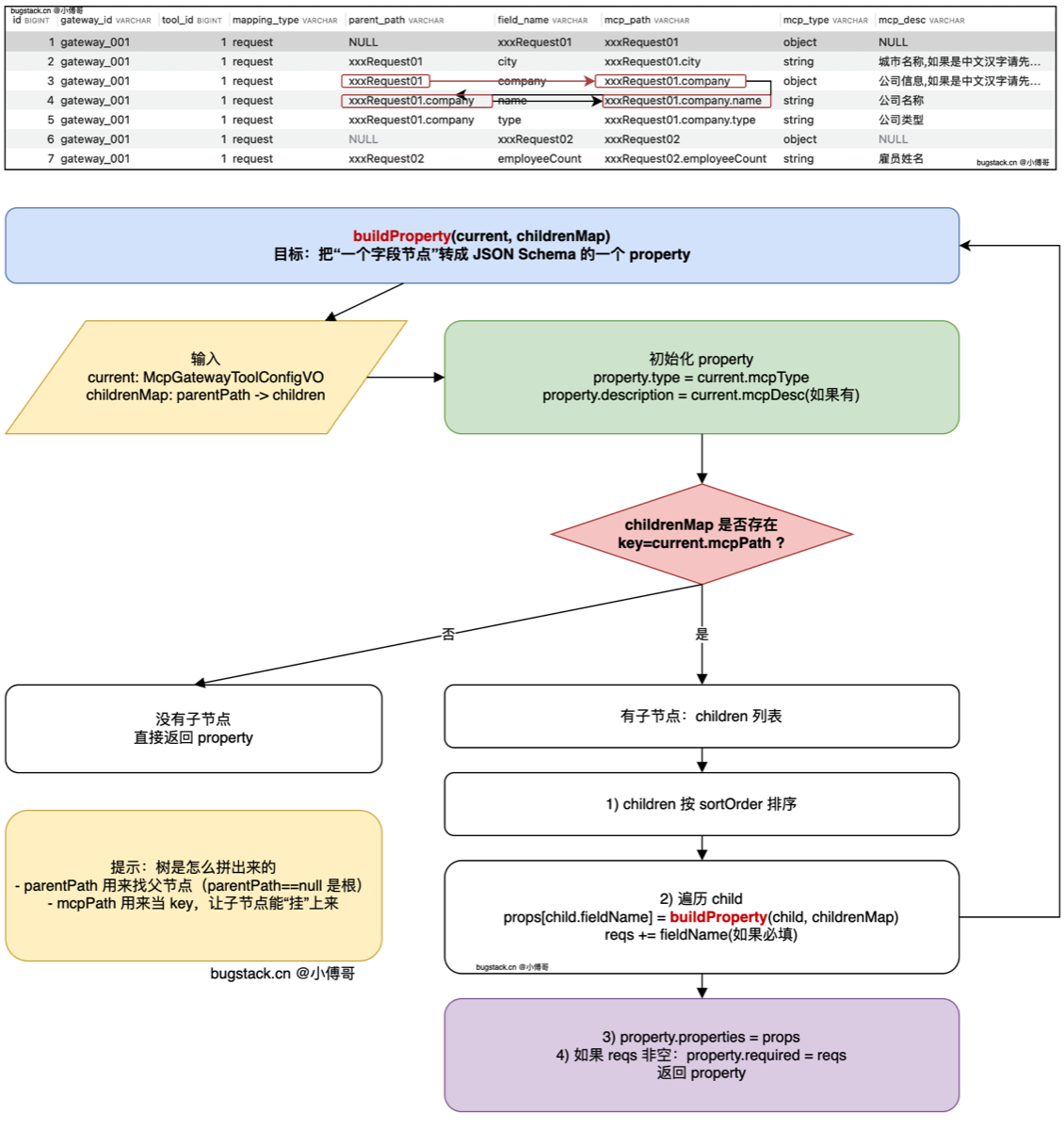
private Map<String, Object> buildProperty(McpGatewayToolConfigVO current, Map<String, List<McpGatewayToolConfigVO>> childrenMap) {
        Map<String, Object> property = new HashMap<>();
        property.put("type", current.getMcpType());
        if (current.getMcpDesc() != null) {
            property.put("description", current.getMcpDesc());
        }

        // 校验孩子元素
        List<McpGatewayToolConfigVO> children = childrenMap.get(current.getMcpPath());
        if (children != null && !children.isEmpty()) {
            Map<String, Object> props = new HashMap<>();
            List<String> reqs = new ArrayList<>();

            // 排序
            children.sort((o1, o2) -> {
                int s1 = o1.getSortOrder() != null ? o1.getSortOrder() : 0;
                int s2 = o2.getSortOrder() != null ? o2.getSortOrder() : 0;
                return Integer.compare(s1, s2);
            });

            for (McpGatewayToolConfigVO child : children) {
                // 注意,buildProperty 嵌套递归,一层层的寻找,是否还有孩子元素(children)
                props.put(child.getFieldName(), buildProperty(child, childrenMap));
                if (Integer.valueOf(1).equals(child.getIsRequired())) {
                    reqs.add(child.getFieldName());
                }
            }

            property.put("properties", props);

            if (!reqs.isEmpty()) {
                property.put("required", reqs);
            }

        }

        return property;
    }
9.Tools/Call
从“能列出工具”进入“真的去调用后端 HTTP 服务”
- @Tool 方式是“本地方法直接暴露成工具”,
- 工具来源:本地 Java 方法
- 工具注册:@Tool + MethodToolCallbackProvider
- tools/list:Spring AI 自动生成
- tools/call:Spring AI 自动调用对应方法
- 参数 schema:从方法参数/对象结构推导
- 适合:自己写 MCP Server、工具少、开发快
- Gateway 方式是“把外部 HTTP 能力包装成工具”。
-
工具来源:数据库配置 + 外部 HTTP 服务
-
工具注册:自己查库组装
-
tools/list:自己查 mcp_protocol_mapping 拼 schema
-
tools/call:自己查 mcp_protocol_registry 再发 HTTP
-
参数 schema:数据库配置驱动
-
适合:平台、网关、多工具、多租户、动态接入
-
新建mcp_protocol_registry表,添加具体Http 接口的映射关系,并新建 ProtocolConfigVO和对应的仓储查询接口
- httpUrl
- httpHeaders
- httpMethod
- timeout
新建一个领域层的ISessionPort接口,在基建层实现此接口真正的发送 HTTP 请求,将以上配置和参数传入 Port 层,拼接请求头,判断是post 还是 get,来进行不同 url 拼接和参数拼接,之后进入GenericHttpGateway.postOrget(…)
public class SessionPort implements ISessionPort {
    @Resource
    private GenericHttpGateway gateway;

    private final ObjectMapper objectMapper = new ObjectMapper();

    @Override
    public Object toolCall(McpGatewayProtocolConfigVO.HTTPConfig httpConfig, Object params) throws IOException {
        // 1. 构建请求头
        String httpHeadersJson = httpConfig.getHttpHeaders();

        Map<String, Object> headers = objectMapper.readValue(httpHeadersJson, Map.class);

        // 2. 判断请求方法
        String httpMethod = httpConfig.getHttpMethod().toLowerCase();

        // 3. 参数校验
        if (!(params instanceof Map<?, ?> arguments)) {
            throw new AppException(ResponseCode.ILLEGAL_PARAMETER.getCode(), ResponseCode.ILLEGAL_PARAMETER.getInfo());
        }

        switch (httpMethod) {
            // 1. 构建请求体
            case "post": {
                RequestBody requestBody = RequestBody.create(JSON.toJSONString(arguments.values().toArray()[0]),
                        MediaType.parse("application/json"));

                Call<ResponseBody> call = gateway.post(httpConfig.getHttpUrl(), headers, requestBody);
                ResponseBody responseBody = call.execute().body();

                assert responseBody != null;

                return responseBody.string();
            }
            // 2. 执行get请求
            case "get": {
                Map<String, Object> objMapRequest = new java.util.HashMap<>((Map<String, Object>) arguments.values().toArray()[0]);

                String url = httpConfig.getHttpUrl();
                // 替换路径参数
                Matcher matcher = Pattern.compile("\\{([^}]+)\\}").matcher(url);
                while (matcher.find()) {
                    String name = matcher.group(1);
                    if (objMapRequest.containsKey(name)) {
                        url = url.replace("{" + name + "}", String.valueOf(objMapRequest.get(name)));
                        objMapRequest.remove(name);
                    }
                }

                Call<ResponseBody> call = gateway.get(url, headers, objMapRequest);

                ResponseBody responseBody = call.execute().body();

                assert responseBody != null;

                return responseBody.string();
            }
        }

        throw new AppException(ResponseCode.METHOD_NOT_FOUND.getCode(), ResponseCode.METHOD_NOT_FOUND.getInfo());
    }
}
声明GenericHttpGateway的接口,让 Config 根据接口声明一个 HTTP 客户端的实例
public interface GenericHttpGateway {
    @POST
    Call<ResponseBody> post(
            @Url String url,
            @HeaderMap Map<String, Object> headers,
            @Body RequestBody body
    );
    @GET
    Call<ResponseBody> get(
            @Url String url,
            @HeaderMap Map<String, Object> headers,
            @QueryMap Map<String, Object> queryParams
    );
}
Spring 自己也有 HTTP 客户端方案,比如:
-
RestTemplate
-
WebClient
-
这里使用第三方 HTTP 客户端
- OkHttp:底层 HTTP 客户端
- Retrofit:基于 OkHttp 的声明式接口封装
@Configuration
public class HTTPClientConfig {
    @Bean
    public OkHttpClient okHttpClient() {
        return new OkHttpClient.Builder()
                .connectionPool(new ConnectionPool(10, 5, TimeUnit.MINUTES))
                .retryOnConnectionFailure(true)
                .connectTimeout(100, TimeUnit.SECONDS)
                .readTimeout(300, TimeUnit.SECONDS)
                .writeTimeout(300, TimeUnit.SECONDS)
                .build();
    }
    @Bean
    public GenericHttpGateway genericHttpGateway(OkHttpClient okHttpClient) {
        Retrofit retrofit = new Retrofit.Builder()
                .baseUrl("http://127.0.0.1/")
                .addConverterFactory(GsonConverterFactory.create())
                .client(okHttpClient)
                .build();
        return retrofit.create(GenericHttpGateway.class);
        //实际对象是 Retrofit 动态代理生成的实例
    }

}
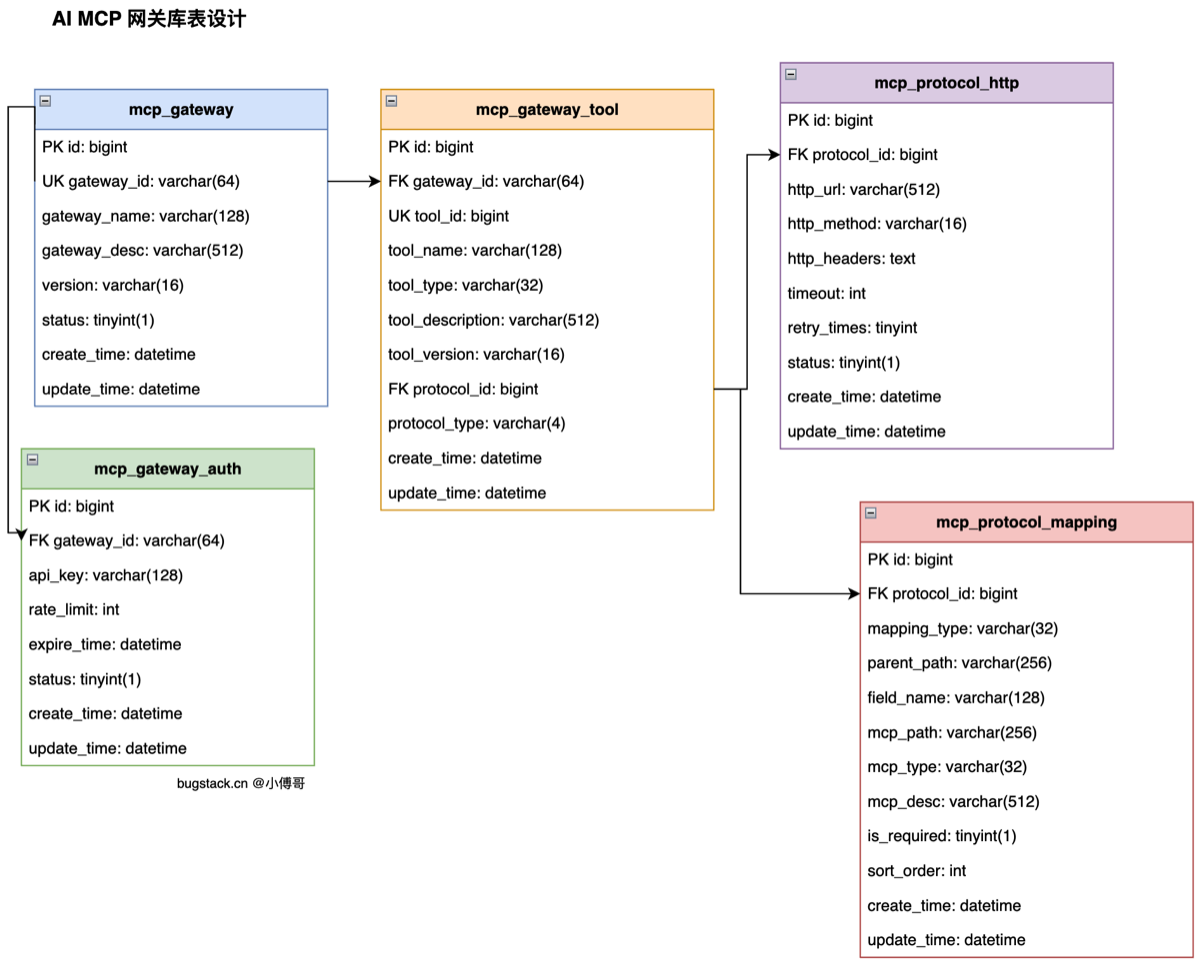
10.网关协议表
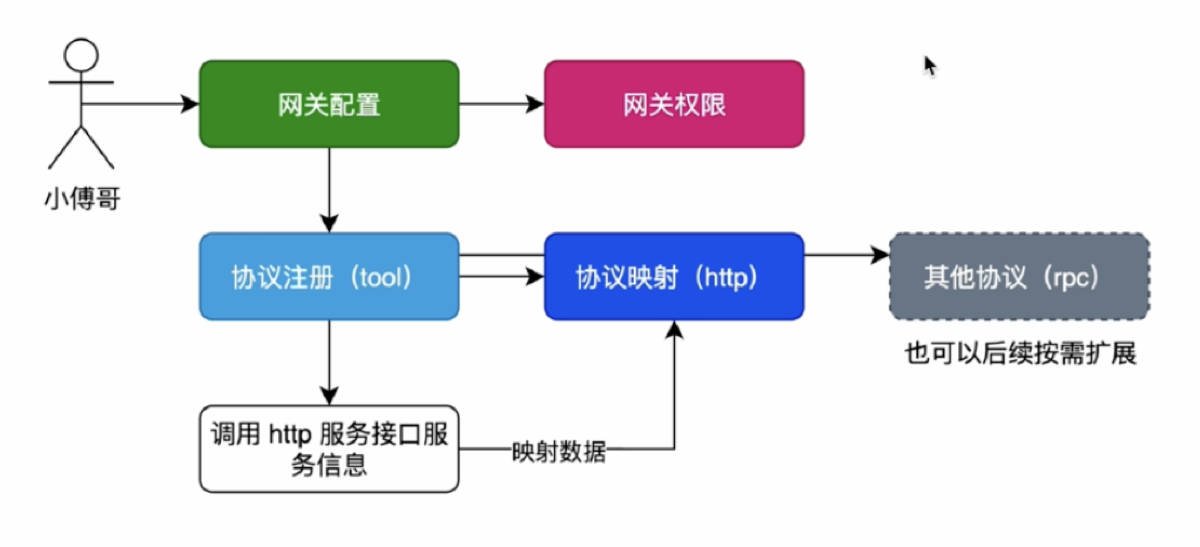
- 新增设计 mcp_gateway_tool、mcp_protocol_http 表,去掉原有的 mcp_protocol_registry 表。使用 protocol_id 进行衔接,protocol_type 区分协议类型,如果是 http 的,则可以指定到 mcp_protocol_type 表查询,如果将来还有其他的类型,则可以查询其他表数据。
mcp_protocol_registry 拆成 mcp_gateway_tool + mcp_protocol_http ToolsCallHandler.java 现在按 gatewayId+ toolName 去查协议配置,而不是只按 gatewayId